
Policing and city control rooms
Watch list matches flagged across a city camera network and pushed to the control room, with a map showing where and when each person was seen.
How the sector deploys itEvery face your cameras see, matched against the watch lists you build. On your hardware, inside your network, with nothing leaving the site
What resolves the alert
Interface simulation: an illustration of the workflow, not a live analysis
What it is
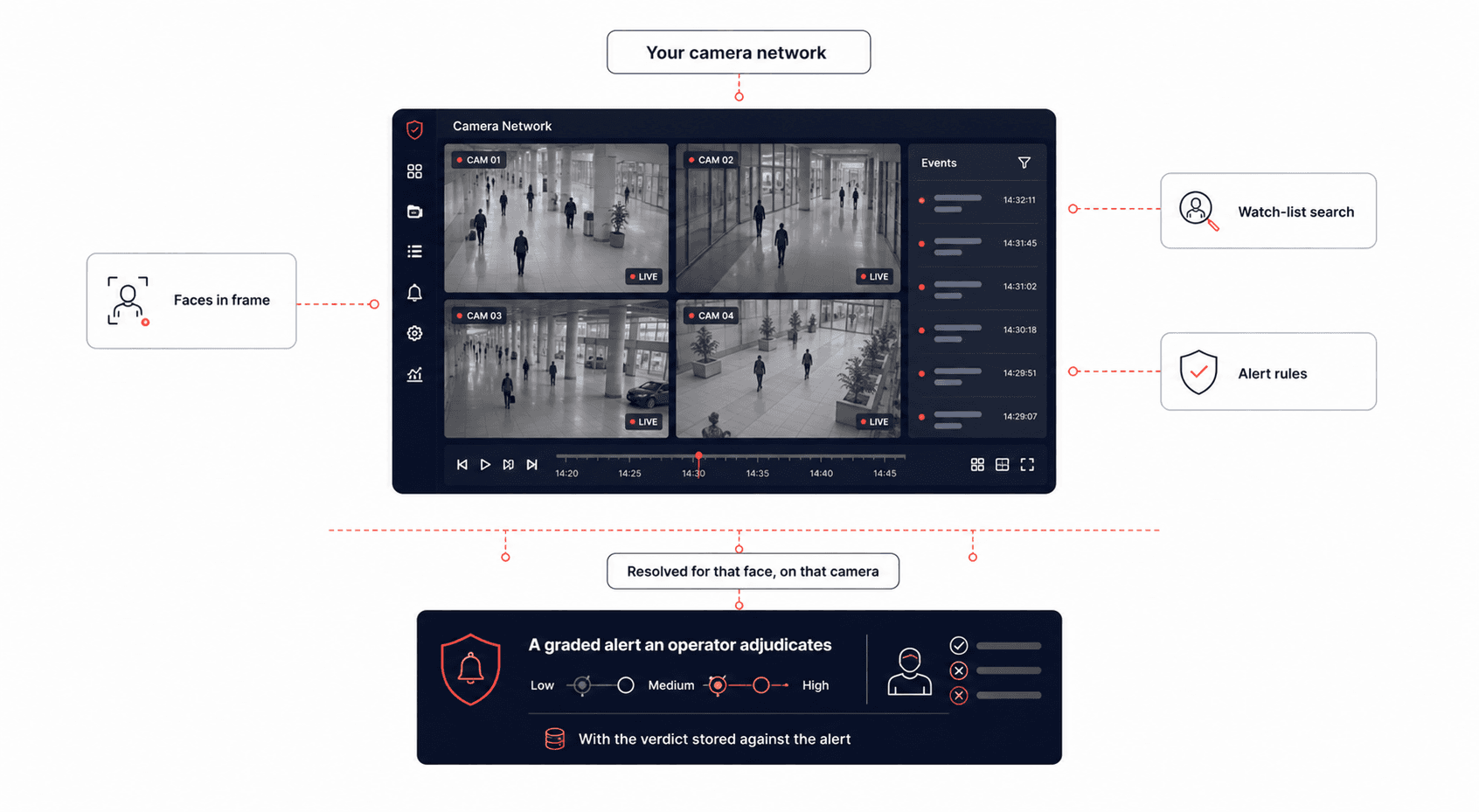
CrossCam PersonTrack works with the cameras you already have. It finds the faces in view, compares them against the watch lists you build, and returns a shortlist of likely matches with a confidence score on each, in a fraction of a second even when the list is very large.
Around that sits the part that decides whether a system survives a real control room. Alert rules that can differ by person, by list, by camera and by area. A review screen where an operator confirms or rejects a match rather than accepting whatever appeared. A retention policy that can erase the biometric record while leaving the case history intact. And a log of every action anyone took.
It runs on your own hardware, on Windows or Linux, and makes no call outside your network.
It was built line by line against a government tender specification, and nearly all of the buildable requirements work today. The few that do not are named openly at the walkthrough.
Fast on large lists
A match returned in a fraction of a second, even against very large watch lists
Seven levels
Alert level, colour, sound and route all decided down a seven step ladder
2,776
Camera models checked for suitability before you buy, not after installation
Nothing leaves the site
Runs on your hardware, on Windows or Linux, and can run with no internet at all
How it works
Your existing cameras are watched continuously, and a camera that drops out is picked back up on its own.
Every face in view is found, including faces turned away, partly hidden or behind a mask.
Each face is turned into a small numeric record. The picture itself is no longer needed after this point.
That record is compared against your watch lists, and the closest candidates come back with a confidence score on each.
Your rules decide how urgent the alert is, what it looks and sounds like and where it goes, then the alert is raised and the sighting recorded.
Interface simulation: an illustration of the workflow, not a live analysis
Your existing cameras are watched continuously, and a camera that drops out is picked back up on its own.
Every face in view is found, including faces turned away, partly hidden or behind a mask.
Each face is turned into a small numeric record. The picture itself is no longer needed after this point.
That record is compared against your watch lists, and the closest candidates come back with a confidence score on each.
Your rules decide how urgent the alert is, what it looks and sounds like and where it goes, then the alert is raised and the sighting recorded.
What makes it different
Rules that go seven levels deep
Interface simulation: an illustration of the workflow, not a live analysis
How it compares
Live matching across the network
Watch lists with their own alert levels
Ranked alerts with past sightings attached
Review tools for confirming a match
Searching recorded video after the event
Deletion policy that runs on its own
A log of every operator action
Runs on your hardware with no internet
Sends alerts to your control room
The architecture
The pipeline above is the five steps one frame passes through. This is what survives them.
Find, record, compare
The picture is not needed once the face record is made.
What was measured
Speed on a very large list
A search against a watch list of a million people returns in a fraction of a second
Public tenders commonly ask for a result within a few seconds on a list a fraction of that size
How small a face can be
Smaller than most people expect, but the practical limit depends on your cameras
Testing used clean studio images. Real cameras add noise and compression, so the camera survey settles this before anything is installed
Speed with a graphics card
Runs on an ordinary server, and goes several times faster from end to end with a graphics card
Which is what makes a larger camera network practical
Resistance to a fake face
Genuine faces accepted correctly, and most simulated attacks rejected
Those attacks were simulated in software. Held up photographs and screens on your own cameras need separate testing
Nearly all of the buildable requirements in the government tender this was built against work today. The few that do not, along with the fake face testing above, are the honest gaps. Bring them to the walkthrough.
Use cases by sector
Watch list matches flagged across a city camera network and pushed to the control room, with a map showing where and when each person was seen.
How the sector deploys itScreening at controlled points where a lot of people pass through. A shortlist of candidates lets an officer decide rather than accept an automatic verdict.
How the sector deploys itStrict alert settings on restricted areas and looser ones on the perimeter, fake face checks on approach cameras, and a full log of everything an operator did.
Visitor and watch list screening with the privacy controls a public deployment needs: faces that are not matches stay blurred, and records are deleted on schedule.
Screening at entry lanes for the length of an event. Cameras added while it runs, watch lists loaded before the event and deleted by policy afterwards.
How the sector deploys itAlerting across several sites without each one becoming an island of data. Every site works on its own and reports back to the centre.
How the sector deploys itDeployment
01 · Camera survey
Interface simulation: an illustration of the workflow, not a live analysis
Recognition happens on your own servers. Where a site is remote, the face is turned into its small numeric record there and only that record travels, never the video. Your identities, watch lists, sightings, alerts and the activity log all live in a database you control. The one outbound connection is the link to your own control room, and it points wherever you tell it to.
Data protection
Where the data lives, what is kept and for how long, who can see it, and what happens to the faces you were never looking for
Face recognition software for live camera networks, run entirely on your own hardware. It finds faces on your existing cameras, matches them against watch lists you build, and raises graded alerts, with the operational parts around it: operator review, deletion policy, activity logging, reporting and keeping several sites in step.
A match against a watch list of a million people comes back in a fraction of a second. Public tenders commonly ask for a result within a few seconds on a much smaller list, so there is a wide margin.
Smaller than most people expect, but the honest answer depends on your cameras. Laboratory testing used clean studio images, and real cameras add noise and compression that raise the practical limit. The camera survey settles it for your positions before anything is installed.
Yes. A face that is turned away is corrected before it is compared, and how far it was turned is reported alongside the result so you can choose to ignore a difficult angle. Faces with the nose and mouth covered have been identified correctly in testing.
Yes. A folder of images or a video file can be searched as a job, and every match is returned. This is what teams use for an investigation after the event.
Yes, with a caveat worth stating plainly. Genuine faces were accepted and most simulated attacks were rejected in testing, but those attacks were simulated in software. Held up photographs and screens on your own cameras need separate testing, and it is worth asking for that as part of a pilot.
Not by appearance. It links sightings across cameras by recognising the same face, so the person has to be on a watch list or identified from a submitted picture first. Following an unidentified person by their clothing is a different technique and a different product, which on this site is AnonymousPersonID.
An ordinary server is enough to begin, running Windows or Linux. Adding a graphics card makes it several times faster from end to end, which is what you do when the camera network grows.
Yes, through a documented connection for sharing alerts and match details. That connection is the only outbound path, and it points wherever you route it.
The rest of the line
Where it runs
Each sector page covers the threat model, the controls, and the regulators that apply.
A walkthrough covers the operator screen, how the alert rules are set, what a deployment across your sites would look like, and an honest read on what your current cameras can and cannot deliver.