
Airports and transport hubs
Watch passenger numbers in waiting areas, entrances, boarding zones and other busy places.
How the sector deploys itWatch how busy every part of a site is getting across all your CCTV cameras. Give each area the limit that suits it, and get an alert the moment one of them goes over
What is watched
Interface simulation: an illustration of the workflow, not a live analysis
What it is
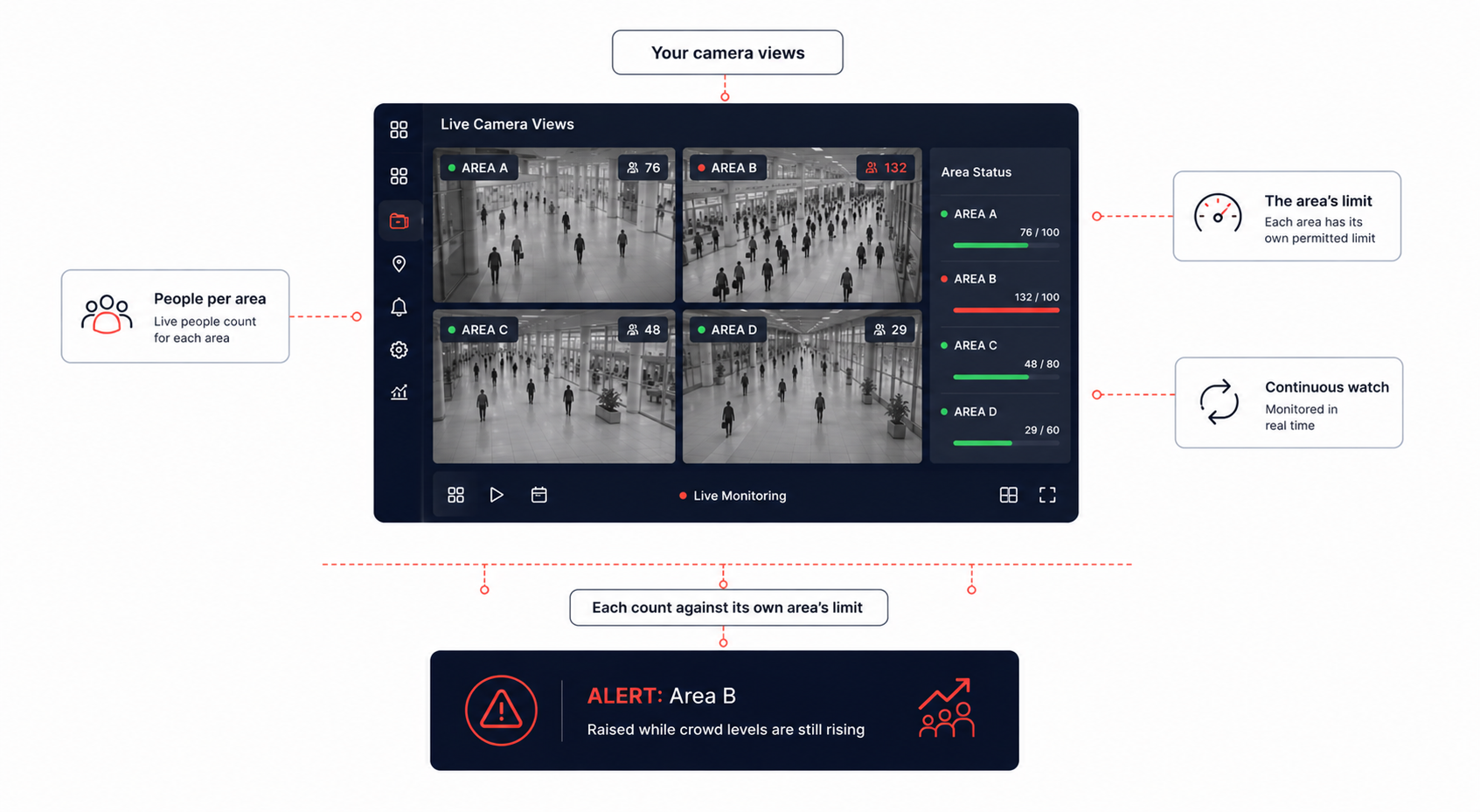
CrowdSentinel AI keeps track of how busy each part of a location is getting, working across all the CCTV cameras you already have. Every area you watch can carry its own limit on how many people belong in it, and an alert is raised when the number in that area goes past the level allowed.
It replaces the job of watching screens and judging crowd size by eye, which is the part that gets hardest exactly when it matters most.
Limits are set for each area on its own, so an alert tells you the specific place where numbers have gone too high.
Every camera at once
Watch how busy things are across several CCTV cameras at the same time
A limit per area
Give every area you watch its own maximum number of people
Alerts raised for you
An alert when an area goes above the level allowed for it
Watching without a break
The areas you chose stay watched for as long as you need
How it works
Several CCTV cameras covering different parts of a location are watched at the same time.
Each camera view is read as the specific areas marked within it, and each one is watched independently.
The number of people inside each watched area is kept track of continuously.
Each area's count is compared against the maximum you set for that area.
Going over the limit raises an alert naming the area, while numbers are still climbing.
Interface simulation: an illustration of the workflow, not a live analysis
Several CCTV cameras covering different parts of a location are watched at the same time.
Each camera view is read as the specific areas marked within it, and each one is watched independently.
The number of people inside each watched area is kept track of continuously.
Each area's count is compared against the maximum you set for that area.
Going over the limit raises an alert naming the area, while numbers are still climbing.
Product exclusiveness
The capabilities below are the ones that decide whether a crowd is managed or merely observed
Every camera watched together
Interface simulation: an illustration of the workflow, not a live analysis
Market comparison
Watch crowds across several cameras
Count people in a watched area
Set a separate limit per area
Notice an area getting too full
Alerts raised automatically
Several areas watched at once
Watching without a break
Names the area that went over
Awareness while numbers climb
The architecture
The pipeline above is a straight line. This is the fan it flattens: where each area gets judged against its own setting.
Monitored areas
An alert in one area does not depend on the crowd level in another.
Use cases by sector
Watch passenger numbers in waiting areas, entrances, boarding zones and other busy places.
How the sector deploys itKeep track of how busy platforms, entrances and other high traffic areas are getting.
Watch crowd levels at entrances, in food courts, along corridors and across other busy sections.
Help organisers watch crowd sizes across different sections and respond when one area gets too full.
Watch numbers around entrances, exits, seating areas and other parts of a venue.
Help authorities keep track of crowd levels across large gathering areas and see where numbers are climbing.
Watch specific sections of large facilities where keeping numbers under control matters.
Deployment strategy
01 · Connect the cameras
Interface simulation: an illustration of the workflow, not a live analysis
CrowdSentinel AI works across several CCTV cameras covering different parts of a location. Each area can be given its own limit, so the same setup suits both a large concourse and a small room.
Which area an alert belongs to, when it reaches the people who can act, and how much of the site is covered
You set a maximum number of people for each area according to its size and use. The number inside that area is counted continuously, and an alert is raised when the count goes above the limit you set.
Yes. Each area carries its own maximum, so a busy concourse and a small room are managed against what each can hold. An alert in one area does not depend on how busy another is.
Several, covering different parts of a location. Each camera view can also be divided into more than one area, so a single camera can carry several watched areas.
No. The areas you chose stay watched throughout, which removes the need for staff to keep counting by eye. Alerts arrive while numbers are climbing rather than being found afterwards.
Yes. Areas are watched independently, so an alert names the exact place where numbers have gone too high and staff can go straight there.
Three things. Connect the CCTV cameras covering the places you want watched, divide each view into the areas that matter, and set a maximum number of people for each of them.
The rest of the line
Where it runs
Each sector page covers the threat model, the controls, and the regulators that apply.
Bring your own footage. We will run it through the Adaptive Cognito Engine and walk you through the findings.