
Banking and finance
Verify identity records and review submitted statements for signs of forgery during customer onboarding and account checks.
How the sector deploys itCheck whether photographs, documents and identity papers are real, edited or AI-generated. Upload a file through the web app or send it from your own systems, and it returns a clear verdict: authentic, suspicious or forged, backed by visual evidence and plain-language reasoning anyone can follow
What is considered
Interface simulation: an illustration of the workflow, not a live analysis
Fraud ID Guard for identity documents
Aadhaar
The submitted Aadhaar is flagged, and the check names the tell rather than only returning a score: one field has been re-typed in a font that does not match the rest of the card, and that mismatch is what marks the document as edited.
PAN card
Three alterations marked on a single card before it is even submitted: the name line, and two runs of the PAN alphanumeric sequence, each boxed where the check found it. The marked-up image is what goes forward for analysis.
Cheque
The specialised system that handles cheques and alternative documents returns forgery detected. Two places carry the marks: the MICR line along the bottom edge, and the signature above it.
Invoice
The invoice comes back at high fraud risk, and the reading is cumulative rather than a single tell: digital markers left by how the file was produced, structural inconsistencies inside the document, and individual line items flagged where the check found them.
What it is
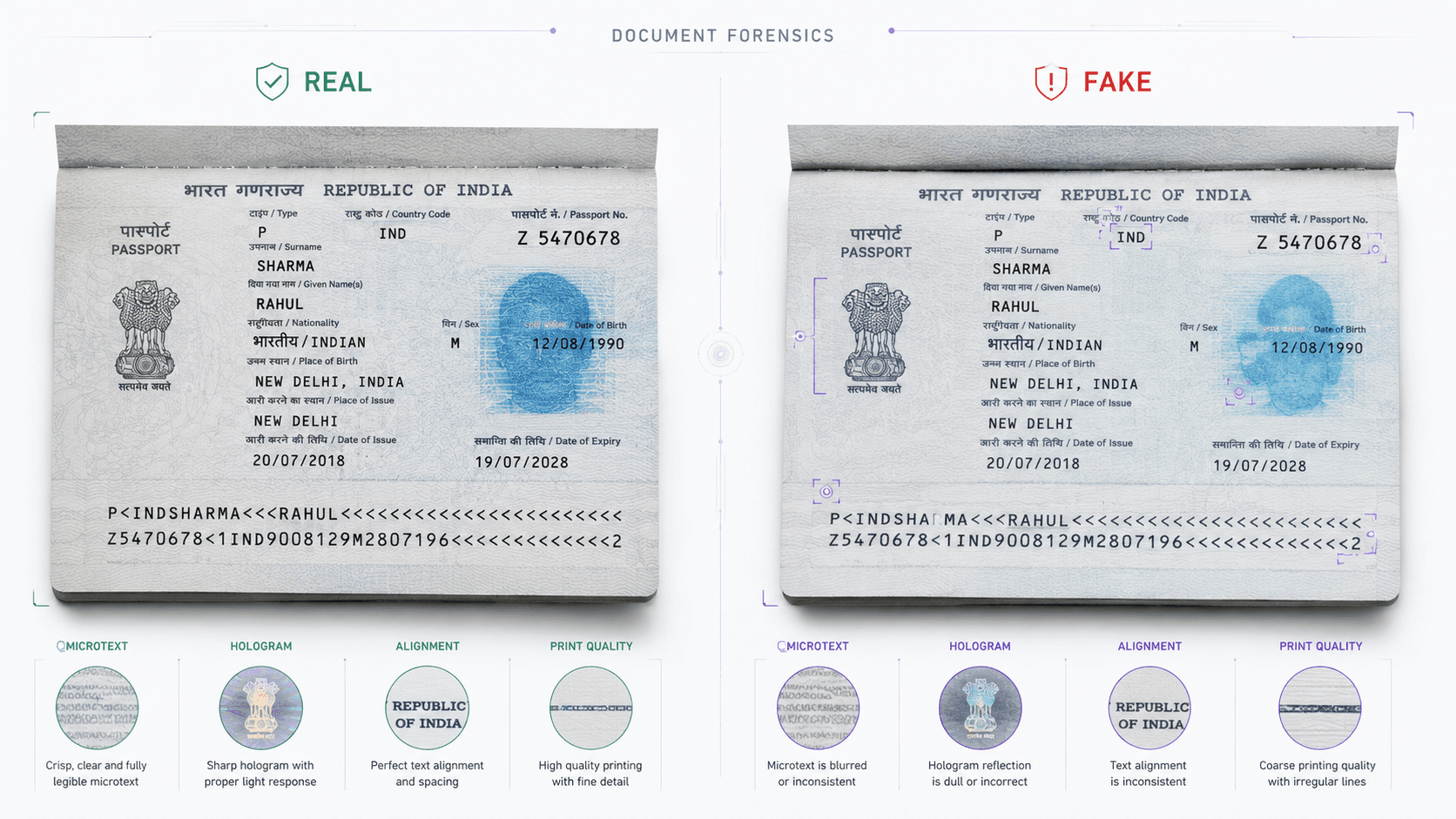
DeepFraudGuard helps organizations determine whether photographs, documents and identity records appear real, manipulated or artificially generated. It brings different forms of digital evidence together to identify suspicious alterations and present the findings in a clear, understandable way.
Users can submit files directly through the platform or connect verification with existing business workflows. The result is a straightforward authenticity assessment supported by visual findings and plain language explanations, helping teams investigate suspicious media and documents with greater clarity.
Because a forgery has to fool all of them together, none slips through on a single weak check.
Try it here
JPG, PNG, WEBP or PDF up to 20 MB
The engine is chosen for you · 1 credit
1 credit per check
Run the same engines the API runs, on a file of your own, with every signal family shown.
10 / 10Free checks left
See credit termsPreview of the output format. The signal scores and the verdict shown here are derived in the browser from the file’s name and size, not measured by the forensic engines, though the job flow, the engine routing and the corroboration rule are the real ones. Book a walkthrough to have files of your own run for real.
6 signal families are consulted on every file.
How it works
Upload an image or document through the web application or send it from an existing business workflow
The submitted file is securely prepared for authenticity verification
It recognizes the type of content and selects the appropriate verification process automatically
The file is examined for signs that may indicate AI generation, digital editing, document tampering or other suspicious inconsistencies
The findings are brought together into a clear authenticity assessment
Supporting visual evidence help reviewers understand why the result was reached
Interface simulation: an illustration of the workflow, not a live analysis
Upload an image or document through the web application or send it from an existing business workflow
The submitted file is securely prepared for authenticity verification
It recognizes the type of content and selects the appropriate verification process automatically
The file is examined for signs that may indicate AI generation, digital editing, document tampering or other suspicious inconsistencies
The findings are brought together into a clear authenticity assessment
Supporting visual evidence help reviewers understand why the result was reached
Product exclusiveness
Multi-signal authenticity verification
Interface simulation: an illustration of the workflow, not a live analysis
How it compares
Checks photographs for AI generation or editing
Checks documents for tampering and forgery
Verifies identity documents such as Aadhaar and PAN
Shows where a document may have been altered
Explains the reasoning behind each assessment
Helps reduce unnecessary fraud alerts
Keeps pace as fraud methods change
Supports high volumes in business workflows
The architecture
One rule stands between them, and two have to agree
What goes in
One unusual finding is not treated as proof. A stronger conclusion is presented only when the supporting findings point the same way, which is what helps real documents avoid being flagged without cause.
Use cases by sector
Verify identity records and review submitted statements for signs of forgery during customer onboarding and account checks.
How the sector deploys itExamine claim photographs and supporting documents for signs of manipulation before a settlement is approved.
How the sector deploys itCheck income proofs, bank statements and identity records for signs of alteration as application volumes grow.
Confirm that submitted certificates and identity records appear genuine before approvals or benefits are granted.
How the sector deploys itAssess whether documentary evidence appears authentic and retain the supporting findings for later review.
How the sector deploys itIdentify artificially generated or altered product and listing images before they reach buyers.
Deployment strategy
01 · Submit the file
Interface simulation: an illustration of the workflow, not a live analysis
Under the hood
How teams reach the platform, work through their cases, connect it to existing processes and keep access under their own control.
DeepFraudGuard is designed to examine photographs, documents and supported identity records for signs of AI generation, digital manipulation, forgery or inconsistency. The appropriate verification process is selected according to the submitted content.
Yes. The platform can examine documents for suspicious alterations, inconsistent information and other indicators that may suggest tampering or forgery. Supporting visual findings help reviewers identify areas that deserve closer investigation.
Fraud ID Guard is DeepFraudGuard's dedicated capability for verifying supported identity documents, with Aadhaar and PAN currently supported as Indian identity documents. It is intended for situations such as onboarding and document review where organizations need greater confidence in submitted identity records.
No. The product is designed to provide an authenticity assessment together with visual findings and understandable reasoning so reviewers can see why a submitted file may require further investigation.
The document verification capability can highlight suspicious areas within submitted content, helping reviewers focus on regions where potential manipulation has been identified.
Yes. DeepFraudGuard supports direct use through its web experience as well as integration with organizational systems, allowing authenticity verification to become part of existing onboarding, fraud review or investigation workflows.
Rather than treating one isolated irregularity as definitive proof of fraud, DeepFraudGuard considers supporting findings together before presenting stronger conclusions. This gives reviewers more context when assessing genuine and suspicious content.
DeepFraudGuard should support investigation and informed decision making rather than replace appropriate human, forensic, compliance or legal review in high stakes situations. The product's own design emphasizes evidence and explainable findings, which are valuable precisely because a reviewer can examine the basis of the assessment.
The rest of the line
Where it runs
Each sector page covers the threat model, the controls, and the regulators that apply.
Book a walkthrough and we will run your own files through the three engines, and show the evidence behind each verdict.